
Feature
AI receptionist workflow builder
Draw what happens on a call. No developer, no script, no waiting on us.
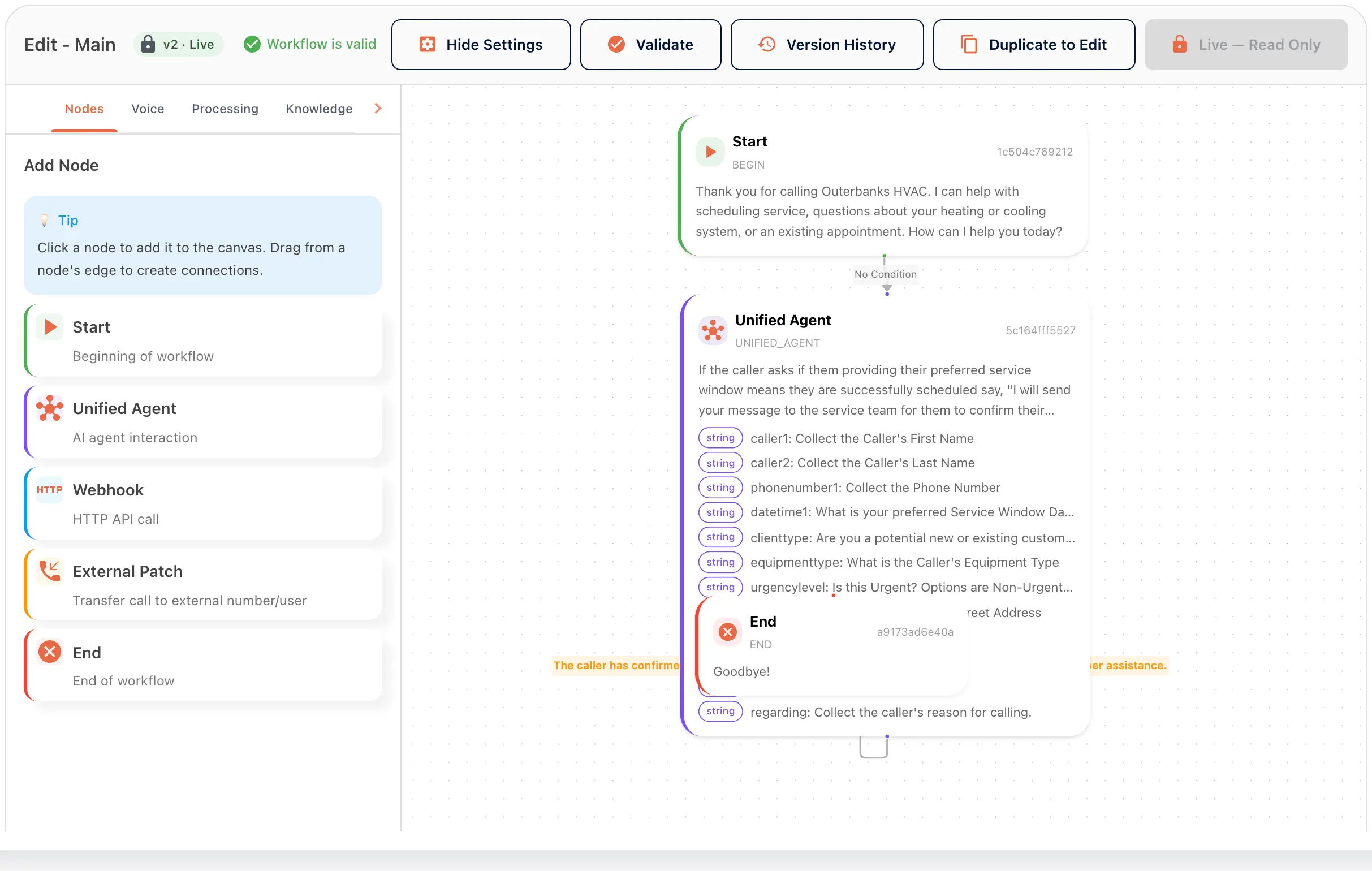
The workflow builder is where you decide what your AI receptionist does on a call. You draw it as nodes on a canvas. There are five node types: Start, Unified Agent, Webhook, Transfer and End. Every connection between nodes can carry a condition, so the path depends on what the caller has said so far. Validate, save, then activate.
How the workflow builder works
Place the nodes
Start holds the greeting. Unified Agent holds the instructions and the details to collect. End says goodbye. Webhook calls your own system mid-call. Transfer, labeled External Patch in the portal, hands the call to a person.
Put conditions on the connections
A condition reads what the caller has said so far. The branch is the connection, not a separate decision box, so the canvas stays readable.
Validate, version, activate
Validate checks the workflow before you save. Activate only a version you have called yourself. Version history compares one version against the one before. To change a workflow that is live, duplicate it to edit.
In the portal
Call Handling › Workflows
The builder shows the workflow name and version, and a Workflow is valid check. The buttons are Validate, Version History, Activate and Save Workflow. The Add Node panel sits beside the canvas. Outerbanks HVAC’s Unified Agent collects the caller’s details, from their name to the reason for calling. The phone number is attached to the workflow last, once it is live.
From the setup walkthrough
A new workflow starts from a blank canvas or from Auto Generate. The workflow description and business context are what the generator reads. Naming it takes a moment, and a draft lands in the Workflows list.
A recording of the portal made on 11 September 2026, 03:01 to 04:18 of the full walkthrough. See every step of the setup.
AI call workflows for businesses with different callers
The self-built plan
Start with Start, one Unified Agent and End. Make a test call. Add branches after you have heard it answer.
The business with two kinds of caller
New customers go one way, existing customers another. One condition on one connection does it.
The team that needs a person on some calls
A Transfer node after Unified Agent is your human backup. Its condition can be as simple as the caller asking for a person.
Goes with
Status read from the same capability matrix as the pricing page.
- Smart transfers and call routing
- Routes or transfers a call to the right person based on what the caller needs.
- Available · All plans
- Real-time query: webhook node
- A workflow node that calls your endpoint mid-call and uses the answer.
- Available · All plans
- Agent Persona
- Define how your receptionist introduces itself, its tone and its goals.
- Available · All plans
- SMS
- Sends and receives text messages as part of a workflow.
- Available · All plans
Defined in the glossary
Integrations
Questions
- Do I need to write code?
- No. You place nodes, connect them and write the conditions, all in the portal.
- What does the Unified Agent node do?
- It runs the conversation: greets, asks, collects the details you listed, and uses the tools you gave it. One node covers the whole exchange.
- What if I break something?
- Duplicate a live workflow to edit it. The live version keeps answering calls while you work. Version history shows what changed against the previous version.
- Is the builder on every plan?
- The availability badge on this page shows the plans that include it. Managed plans include set-up with the team.
See AI in action for your business
Start a free trial and set it up in the portal today, or talk to the team first.