
Feature
AI receptionist call transfers and routing
AI answers. A person is one transfer away, on the calls you decide.
Smart transfers route or hand a call to the right person based on what the caller needs. In the workflow builder, a Transfer node after Unified Agent sends the call to a contact you chose. The condition on the connection decides when. The caller asks for a person, names an emergency, or asks something only you can answer. You choose cold or warm for each one.
How AI call transfers work
Add the people AI can transfer calls to
Contacts are the people your receptionist can hand a call to. Add them, with the cell phone they actually answer, before you add a Transfer node.
Add a Transfer node
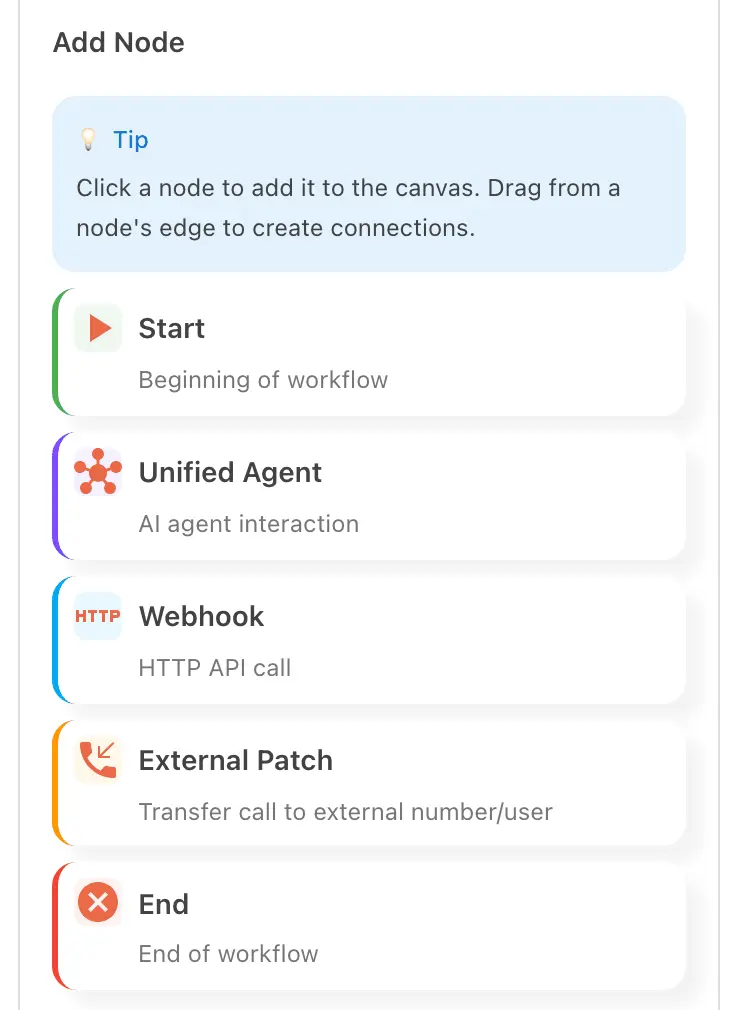
Place it after Unified Agent. The portal labels it External Patch: it transfers the call to an external number or user. Choose cold or warm.
Write the condition
Give the connection a condition, written the way a caller would say it. The receptionist transfers when the call matches.
In the portal
Contacts, then Call Handling › Workflows
The Add Node panel lists Start, Unified Agent, Webhook, External Patch and End. External Patch is the Transfer node. Contacts holds the people it can reach, with name, business and title.
From the setup walkthrough
A transfer target takes a label, a type and a trigger. Cold hands the call over with no introduction. Warm tells the recipient who is calling and why. An urgency field decides which calls go to a person.
A recording of the portal made on 11 September 2026, 06:00 to 07:20 of the full walkthrough. See every step of the setup.
AI call transfers for owners, offices and departments
The call that needs the owner
A caller asks for you by name, or says it is urgent. The receptionist transfers instead of taking a message.
The office with departments
Billing questions go to the office manager. Emergencies go to the on-call phone. One condition each.
The caller who just wants a person
They say so. The receptionist hands the call over. That is the human backup, built in.
Goes with
Status read from the same capability matrix as the pricing page.
- Workflow builder (self-serve)
- Build what happens on a call from a set of nodes. No developer needed.
- Available · All plans
- Escalation to a human desk
- Calls the receptionist shouldn’t handle go to a partner desk staffed by people.
- On the roadmap
Defined in the glossary
Questions
- Who can it transfer to?
- Anyone in Contacts. Add one contact per person, with the phone they actually answer.
- How does it decide when to transfer?
- By the condition you put on the connection to the Transfer node. Write it the way a caller would say it.
- What is the difference between cold and warm?
- Cold hands the call straight over, with no introduction. Warm tells the person who is calling and why. You choose which when you set the transfer up.
- What if nobody picks up?
- Test it before you go live. Have a colleague call and ask for a person, and see where the call lands.
See AI in action for your business
Start a free trial and set it up in the portal today, or talk to the team first.