
Text homeowners the link. Stop spelling web addresses.
A Global Tool lets your AI receptionist text a link when a caller asks for it. Here is how Outerbanks HVAC texts its scheduling page.
November 7, 2026 · 2 min read · aiReceptionist editorial
Some answers are a whole page. The receptionist texts the link during the call, so the caller does not have to remember a web address.
Three callers: HVAC, handyman, and home services
- HVAC: “Can you text me the financing page? I am on a ladder.” Nobody spells a URL from a ladder. A text arrives while they are still talking.
- Handyman: “Can you send me something with your prices?” A pricing page by text, while the caller is still on the phone.
- Home services: “Send me the link to book the water heater install, and the maintenance plan.” Two links, one call. Each is its own tool, each with its own trigger.
“Go to our website, click Book, then...” Half your callers are driving. The other half are holding a flashlight. A text with the link is easier for everyone.
How it works
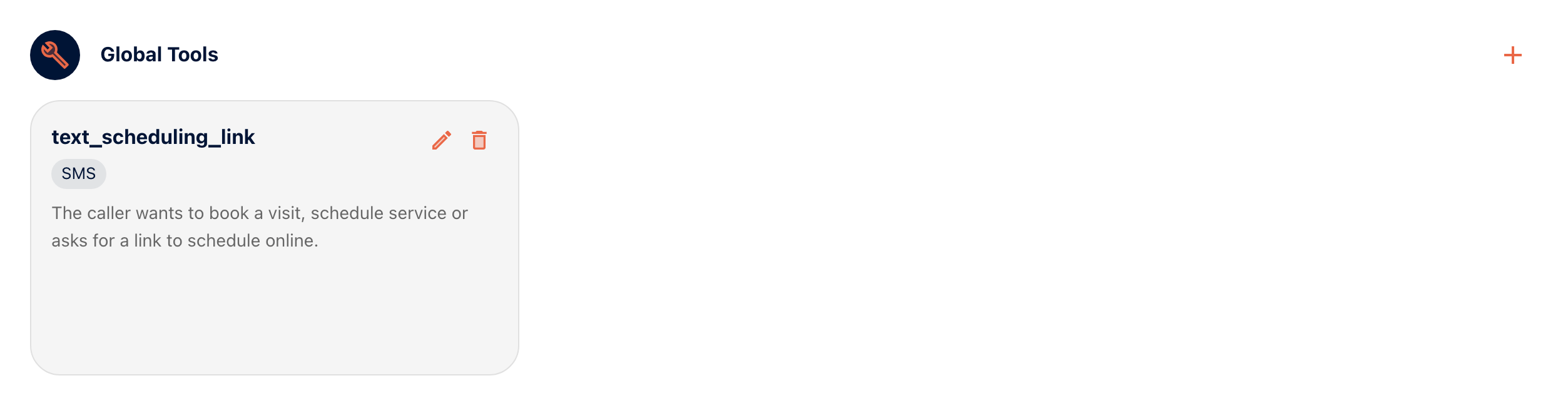
In the portal, Call Handling › Global Tools holds actions your receptionist can take on any call. An SMS tool has three parts: a name, a description that says when to use it, and the message it sends.
Outerbanks HVAC has one, text_scheduling_link. Its description: “The caller wants to book a visit, schedule service or asks for a link to schedule online.” Its message: “Book your Outerbanks HVAC visit here: obxhvac.com/scheduling”.
Write the description like a trigger
The receptionist reads it to decide when to send. Name the moments: wants to book, asks for a link. Keep it to one sentence.
Keep the text short
Who it is from, what the link is, the link. Callers read it at a glance.
One tool per link
Financing, booking, the maintenance plan: each gets its own tool and its own description. Then the receptionist sends the right one.
Talk to the HVAC receptionist and ask how to book.
Ready to stop missing calls?
Try it free, or ask the team how it would work for your business.